
Listen instead
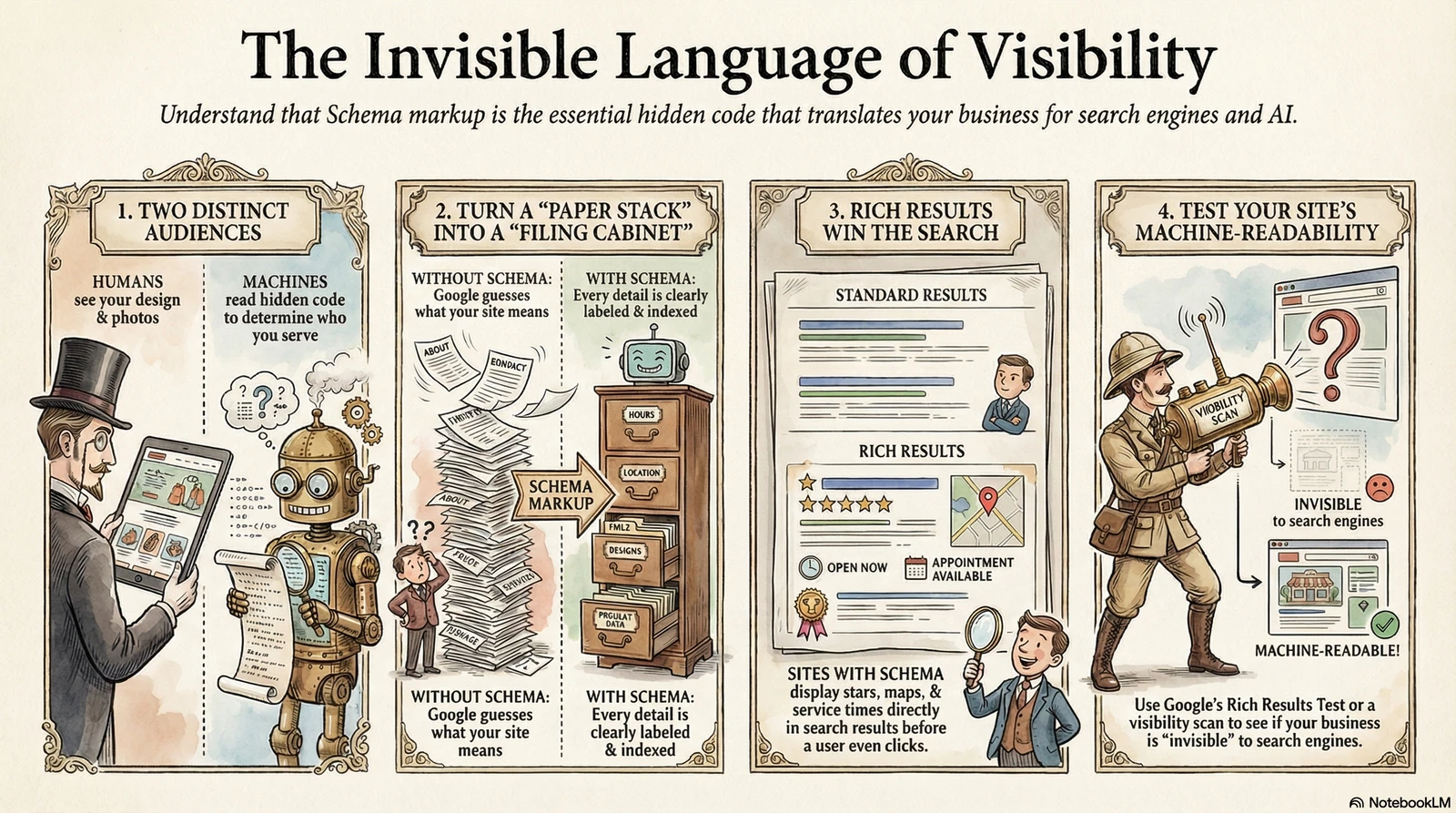
Your website has two audiences. The first group is the people who visit — they see your design, read your words, look at your photos, and decide whether to call you. The second group is the machines: Google, ChatGPT, Siri, Bing, Apple Maps. These systems crawl your site constantly, trying to piece together what you do, where you are, and who you serve.
Most websites only speak to the first group. The content is written for humans, designed for humans, built to impress humans. That’s not wrong — but it’s incomplete. Schema markup is the language you use to speak directly to the second group. It’s invisible code that sits underneath your page and tells search engines and AI assistants exactly what kind of business you are, what you offer, and how to show that information in search results.
Think of it like a beautifully printed business card that you never actually hand to anyone. The information is there. You just haven’t put it in a format anyone can act on.
Schema markup (structured data) is invisible code added to your website that tells search engines exactly what your business is, what you offer, and how to display your information in search results.
What Schema Actually Does
Without schema, Google reads your page the same way a new hire reads a stack of papers on their first day — they can piece things together, but they’re making guesses. They see text, headings, and images, and they work out what it probably means. With schema, Google reads your page like a labeled filing cabinet. Every drawer is clearly marked. “This is the business name. This is the address. This is the service list. These are the hours.”
The practical payoff is what Google calls “rich results” — search listings that show more than just a link and a description. When your site has the right schema, Google can pull your hours directly into the search result. It can show your star rating without anyone clicking through to your site. It can surface your services, your location on a map, your FAQ answers — all before the visitor ever lands on your page.
The difference in search results is visible. Plain blue link with a description on one side. Business name, hours, reviews, and a map snippet on the other. Same Google. Same search. The only difference is the code the second site is sending behind the scenes.
A Church Without Schema vs. With Schema
Someone moves to a new city on a Thursday. Sunday is coming. They open Google and type “Baptist church near me with Sunday morning service.”
Church A has Church schema installed, with service times, denomination, address, and a phone number structured into the code. Google surfaces it with a map snippet showing the location and a search result that lists Sunday service at 10:30 AM. The visitor reads that in eight seconds without visiting the site at all — and they show up Sunday morning.
Church B has all the same information. It’s on the homepage. It’s on the contact page. It’s even in the footer. But it’s written as a paragraph, with no schema telling Google what any of it means. Google shows a plain link. The visitor clicks through, waits for the page to load, and tries to find the service time buried somewhere in the layout. Some of them make it. Some don’t bother.
Same gospel. Same community. One church made it easy for the machine to understand them, and it shows in visibility. For church websites, this gap is more common than you’d think — and it’s one of the first things a visibility audit surfaces.
Schema doesn’t change what your visitors see. It changes what Google, AI assistants, and voice search understand about your business.
A Business Without Schema vs. With Schema
Someone’s shoulder has been bothering them for two weeks. They search “chiropractor for neck and shoulder pain near me.” Two practices come up side by side.
Practice A has LocalBusiness schema, MedicalBusiness schema, and review schema. The search result shows four-and-a-half stars, the number of reviews, and a brief list of what they treat. A person in pain, scanning results, sees social proof and relevant services without clicking anything.
Practice B has no schema. Their search result is a link and a two-line description that the designer probably wrote two years ago. No stars. No services. Nothing to signal that this practice treats exactly what this person is searching for.
The patient clicks Practice A. Not because their website is better — they haven’t seen it yet. Because the search result answered more of their question. For healthcare practices and small businesses competing in local search, schema is one of the lowest-effort, highest-impact improvements you can make to how your business appears online.
Why Most Web Designers Skip It
Schema is invisible. Your clients can’t see it when they log in to the backend. They can’t screenshot it for a board meeting. There’s no before-and-after image that demonstrates the work was done.
That makes it easy to skip. Most web designers are trained to focus on what looks good on a screen — typography, layout, color, imagery. Schema doesn’t show up on the design. It doesn’t appear in a browser at all. So it gets deprioritized, or forgotten, or assumed to be someone else’s job.
It’s not negligence. It’s not a scam. It’s a gap in what most web design training covers. Visual design and technical SEO are different disciplines, and most designers live on one side of that line. This is one of the things a proper visibility audit catches — not to blame anyone, but because it’s genuinely worth fixing.
What to Actually Do About It
You don’t need to understand how to write schema to know whether your site has it. Here are three practical steps you can take right now.
1. Test your current site. Go to Google’s Rich Results Test and paste your URL. It takes about ten seconds. The tool tells you what schema is present and whether Google can read it correctly. If it comes back mostly empty, you know where you stand.
2. Ask your web person specifically. The question isn’t “do we have SEO?” — that’s too broad. Ask: “Do we have LocalBusiness schema? Do we have Organization or Church schema? Can Google read our hours and address as structured data?” A specific question gets a specific answer, and it signals that you know what you’re asking about.
3. Run a free scan. The Artifex Visibility Report checks your site automatically, including schema presence, and explains what’s missing in plain language. It takes 30 seconds and doesn’t require you to know any of this terminology to read the results.
If Google can’t tell what your business is from your website’s code — not just its text — you’re leaving visibility on the table.
// FURTHER READING
- Introduction to Structured Data — Google’s official explanation of how structured data works, why it matters, and how to get started with JSON-LD markup on your site.
- Google Search Rich Results Gallery — Every rich result type Google supports, with examples of how each one appears in search. Useful for seeing what’s possible for your specific business type.
- Google Rich Results Test — The official Google tool for testing whether your page has valid schema markup and which rich result types it qualifies for. Paste your URL and see your current status in seconds.
- Schema.org — The authoritative vocabulary reference maintained by Google, Microsoft, Yahoo, and Yandex. Covers 800+ schema types including LocalBusiness, Church, MedicalBusiness, and more.
- Organization Schema Documentation — Google’s specific guidance on implementing Organization schema — the type most businesses and nonprofits should have as a baseline.
Schema is one layer of a bigger system. Our SEO and schema implementation service builds it into the site itself, so Google and AI assistants read your business correctly from day one.